What Is vMix Pro?
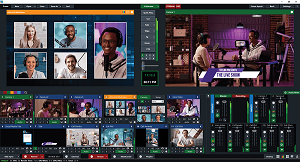
vMix Pro is vmix pro software for live video production. It transforms a single PC into a full broadcast studio. The platform supports up to one thousand total inputs. These include cameras, SRT streams, NDI feeds and web sources. vMix Pro outputs at resolutions up to 4096 × 2160. It offers eight overlay channels for graphics and titles. The Pro edition supports eight vMix Call remote guests. Instant Replay handles up to eight camera angles. MultiCorder records multiple sources independently for post-production. GT Designer Advanced enables custom animated titles and PSD imports. Scripting, PTZ control, and VST3 plugins extend flexibility. External outputs feed broadcast monitors and streaming hardware.
What Makes It Worth Using?
Teams choose vMix Pro for deterministic control during live shows. Every input and transition behaves exactly as configured. No cloud dependency keeps your stream local and secure. The lifetime vmix pro license removes recurring subscription pressure. Sports producers gain dedicated replay hardware without external servers. Churches and schools reuse project files weekly. Corporate teams manage town halls with Zoom participants inside the interface. Remote commentators join through browsers without installing software. The Web Controller turns phones into production switchers. Keyboard shortcuts and MIDI surfaces allow muscle-memory operation. vMix Pro scales from small webinars to stadium broadcasts.
Key Features
- Eight Overlay Channels — Layers graphics, titles, scoreboards, and bugs over live video.
- vMix Call — Brings up to eight remote guests into the production via browser.
- New Audio Buses — Added AB, CD, DE, ABCD, and DEFG bus configurations.
- Zoom Integration — Joins or hosts Zoom meetings with multiple participant inputs.
- Instant Replay — Records and plays back up to eight camera angles with slow motion.
- MultiCorder — Captures selected inputs separately for editing or backup archiving.
- GT Designer Advanced — Builds custom animated titles and imports layered Photoshop files.
- Audio Bus Routing — Routes sound through multiple buses with VST3 plugin support.
- PTZ Camera Control — Operates pan-tilt-zoom cameras directly from the interface.
- Scripting & Automation — Automates actions via triggers, shortcuts, and external APIs.
- Multiple Event Tags — Operators can attach several tags to a single replay event.
- Live Streaming — Sends programs to Facebook, YouTube, Twitch, and custom RTMP servers.
- Per-Camera Storage — Replay cameras can record to separate drives for better disk performance.
- Recording Outputs — Records the program to MP4, MOV, AVI, or other formats locally.
- Color Correction — Adjusts exposure, white balance, and saturation per input.
- Open Media Transport (OMT) — New open-source protocol for 4K and 120fps+ video over LAN.
System Requirements
Windows (Primary Platform)
- Operating System: Windows 10 or 11 (64-bit only)
- Processor: Intel Core i7 or equivalent AMD Ryzen
- Memory: 8 GB DDR4 RAM minimum (16 GB recommended)
- Graphics: Dedicated NVIDIA GPU with Direct3D support
- Storage: SSD for operating system and media (NVMe preferred)
- Network: Gigabit Ethernet for NDI and SRT workflows
mac support for vMix does not run natively on macOS. Intel-based Macs may use Windows via Boot Camp. Apple Silicon Macs have no supported solution currently.
Official Website for software.
What’s New?
vMix 29 brings major workflow improvements and polish. The vmix pro latest version adds significant new capabilities. The additions are:
- Eight Overlay Channels — Overlay count doubled from four to eight in HD and higher editions.
- Replay CPU Reduction — Instant Replay recording and playback now use up to 50% less CPU.
- Quad View Replay — Four camera angles appear simultaneously in high quality for review.
- MultiCorder Bus Selection — All audio buses are now selectable for MultiCorder, not just Master.
- Zoom Events Support — Direct connection to Zoom Events and Zoom Sessions is now available.
- List Input Search — The List input editor now supports searching inside file lists.
- WebP Image Support — Image and Photos inputs now accept WebP files.
- AlphaFade Transition — New effect that fades alpha channel sources with opposite timing.
- AV1 Streaming Fix — Resolved NVIDIA GPU issue when streaming AV1 to YouTube beyond 2 hours 45 minutes.
- SRT Audio Delay Fix — Corrected inaccurate audio delay when using EmbeddedAllChannels.
More softwares like this:
Frequently Asked Questions (FAQ)
- Does vMix Pro support 120fps production?
Yes. vMix handles high frame rate inputs and outputs. OMT in version 29 supports 120fps and beyond.
- Can I use vMix Pro for esports tournaments?
Absolutely. Multi-view layouts, instant replay, and data-driven graphics suit competitive gaming broadcasts.
- Is there a vmix pro apk for Android phones?
No. vMix is Windows-only. There is no vmix pro apk for mobile devices.
- How do I find older builds like vmix pro 24.0.0.72 (x64)?
You can download vmix pro 24.0.0.72 (x64) from the archive.
- Does vMix work with Blackmagic Design hardware?
Yes. vMix supports Blackmagic capture cards alongside other PCIe and USB devices.
- Can I run vMix Pro on a laptop?
A laptop with a dedicated NVIDIA GPU, fast SSD, and sufficient RAM can run vMix Pro reliably.
- Does vMix support vertical video for social platforms?
Yes. Vertical HD output at 1080 × 1920 is available for mobile-first content.
- Can I import my existing OBS scenes into vMix?
No direct import exists. You rebuild scenes using vMix inputs, overlays, and GT Designer titles.
Conclusion
vMix Pro v29 stands as a powerful, Windows-native live production suite. It combines switching, graphics, replay, streaming, and remote contribution. The software rewards teams who invest time in learning. It adds overlays, OMT, and replay efficiency. For broadcasters, sports crews, churches, and corporate studios, vMix Pro delivers. It offers professional results without recurring fees.
[sociallocker]Mirror Link [/sociallocker]
