What Is Wise Data Recovery?
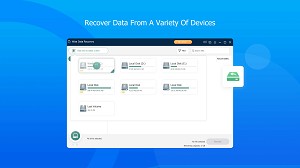
Wise Data Recovery software is a Windows utility that reconstructs deleted files before their storage sectors become overwritten. The program serves people seeking Wise Data Recovery for PC across supported Windows editions. It examines FAT12, FAT16, FAT32, exFAT, NTFS, HFS, HFS+, HFSX, Ext2, and Ext3 volumes. The engine recognizes over 1,000 formats across hard drives, SSDs, USB devices, memory cards, cameras and other media. Quick scanning, targeted filters, portable execution, and WinPE boot support create a fast, safer path toward usable results.
What Makes It Worth Using?
Its strongest advantage is a focused workflow that remains approachable during stressful loss events. Wise Data Recovery download has a small footprint and clear controls.Helpful categories let people prioritize promising items without learning complex forensic applications. These qualities suit everyday emergencies that do not justify laboratory-grade intervention.
Key Features
The Wise Data Recovery portable build reduces installation writes on an affected computer. Its features are:
- Covers accidental deletion, permanent removal, formatting, virus attacks, and system crashes.
- Works with HDDs, SSDs, external disks, flash drives, cards, cameras, phones, and other removable devices.
- Offers a Quick Scan designed to complete routine searches within seconds.
- Narrows results using filename keywords or selected file categories before scanning.
- Provides a portable build that avoids installing software onto the affected computer.
- Supports WinPE boot media for retrieving information from crashed systems.
- Restores up to 2 GB through the free Windows edition.
- Runs on both 32-bit and 64-bit supported Windows editions.
- Uses an 11.4 MB installer and requires only 50 MB of disk space.
System Requirements
Wise Data Recovery free download can restore two gigabytes cumulatively.
Windows
Operating system: Windows 11, 10, 8, 8.1, or 7.
Architecture: Both 32-bit and 64-bit editions are supported.
Processor: A Pentium processor running at 1 GHz or faster.
Memory: At least 4 GB of RAM.
Storage: At least 50 MB for installation.
Legacy exception: The portable version supports Windows XP
macOS
Native support: Wise Data Recovery 6.2.2 has no native macOS build.
Operating system: The alternative is macOS Tahoe 26 through Catalina 10.
Apple silicon: M1, M2, M3, and M4 Macs are compatible.
Important distinction: This partner utility is not the Mac edition of Wise Data Recovery.
Linux
Native support: Wise Data Recovery also does not support Linux.
Volume access: Supported Linux file systems do not make the application Linux-compatible.
Workaround: A supported Windows installation is required to run the program.
What’s New in version 6.2.2?
- Portable Deployment Mode: Offers a standalone portable build that runs directly from a USB flash drive, preventing critical data overwriting on the host hard drive during recovery.
- General Stability & Scan Bug Fixes: Resolved minor bugs identified in previous releases to improve deep scan reliability and overall application stability.
- WinPE Bootable Media Support: Includes advanced WinPE technology allowing users to create bootable media to recover data directly from crashed or unbootable operating systems.
- GUI & Interface Polish: Refined graphical user interface (GUI) layouts, cleaner drive selection menus, and navigation improvements for an intuitive user experience.
- Automatic Scan Result Saving: Automatically saves your most recent scan results and offers to instantly reload them when rescanning the same drive, eliminating repetitive scanning times.
- Updated Multi-Language Translations: Corrected and updated localization dictionaries across various supported global languages.
- Expanded File System & Storage Compatibility: Broadened recovery algorithms to support over 1,000 file formats across FAT, NTFS, HFS, HFS+, HFSX, Ext2, and Ext3 file systems.
- Advanced Multi-Extension & Wildcard Filtering: Enhanced search and filter fields with support for wildcard characters (* and ?) and multiple simultaneous custom file extensions.
Frequently Asked Questions (FAQ)
Can Wise Data Recovery scan an Ext3 disk?
Yes, its specification lists Ext3 support. However, the application must run under a supported Windows version.
Why can a restored file retain its name but remain unreadable?
Directory records may survive after file contents become overwritten or fragmented. Therefore, a familiar filename cannot guarantee usable information.
Is a Wise Data Recovery Pro free download legitimate?
The no-cost edition and paid are different offerings.
Should I repeatedly scan a clicking hard drive?
No. Repeated access can worsen physical damage. Disconnect the device and consult a professional recovery specialist.
Does the portable build eliminate every overwrite risk?
No. It reduces installation writes, but Windows and other applications can still modify the affected volume.
Can Wise Data Recovery restore files after SSD TRIM?
Recovery becomes unlikely after TRIM clears the underlying blocks. Stop using the SSD immediately because further activity may reduce remaining chances.
Is the 2 GB allowance renewed after reinstalling the application?
It has a cumulative 2 GB recovery limit.
Why can one scan show similar files under different paths?
Older directory records can point toward similar content. Compare size, location, condition, and preview information before selecting copies.
Does HFS support make the program compatible with macOS?
No. File-system support describes readable storage formats, not compatible operating systems.
The Windows application remains separate.
Why should restored files go onto another disk?
Saving them onto the source may overwrite other deleted content. Choose a separate, healthy device with enough available capacity.
Can encrypted files always be restored successfully?
No. Usable results may require intact encryption metadata, passwords, keys, and original data blocks.
Conclusion
Wise Data Recovery full version is a compact Windows option for common deletion and formatting incidents. It combines broad format coverage, flexible filters, removable-media support, and a cautious portable workflow. Results still depend on device health and whether the lost sectors remain untouched.
